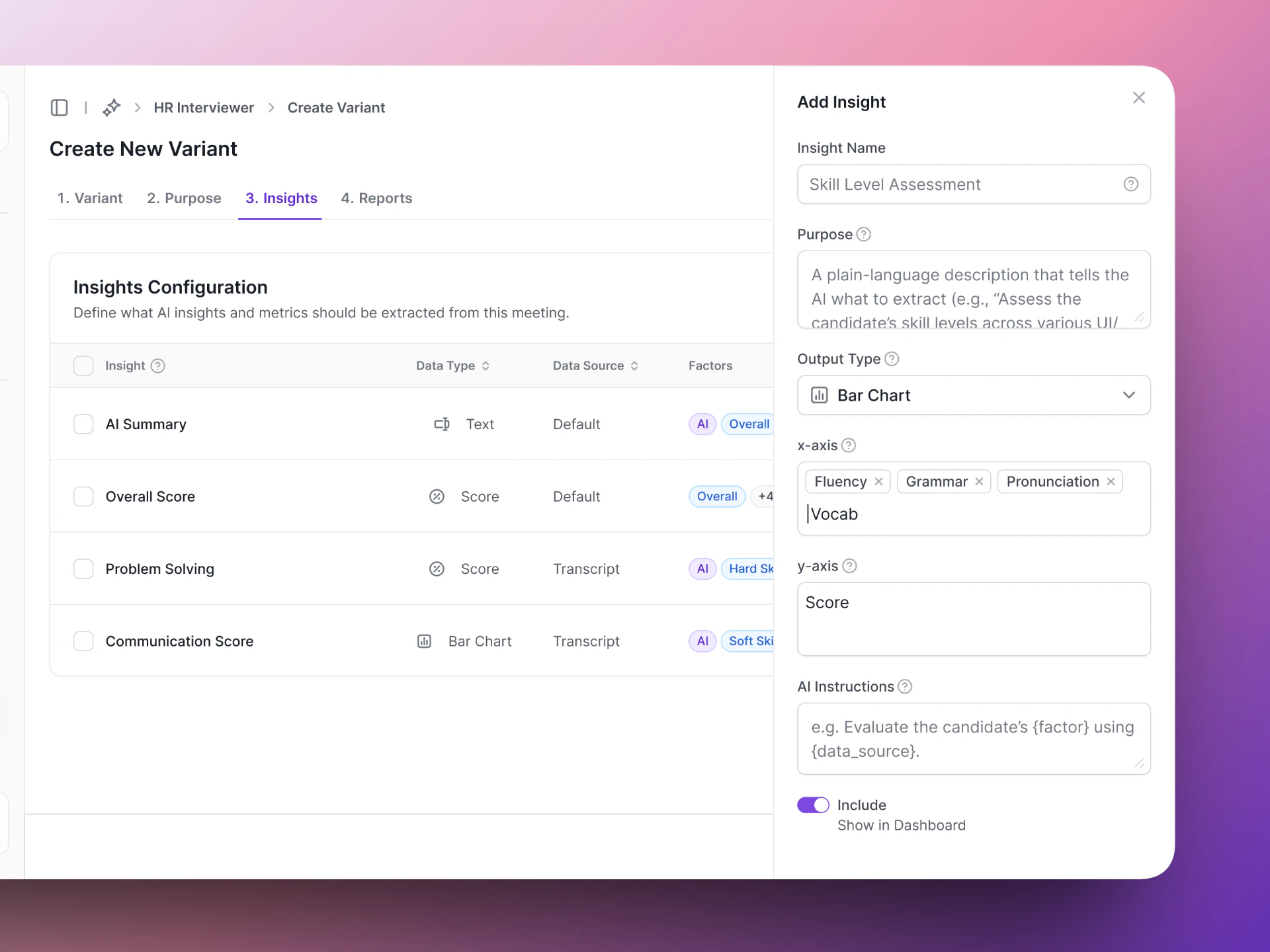
Insights are the structured data points that Vocalis extracts from each conversation. Instead of just giving you a raw transcript, the AI Actor pulls out the specific information you care about — scores, key answers, and visual breakdowns. You configure Insights in Step 3 (Insights) of the AI Actor setup wizard.

Auto-generating insights

Click Auto-generate Insights to let the AI suggest a starting set of insights based on your Actor’s purpose. You can edit or remove any of the generated insights afterward.

Adding an insight manually

Click + Add Insight to open the side panel. Fill in the following fields:
FieldWhat it means
Insight NameA label for the data point (e.g., “Skill Level Assessment”).
PurposeA plain-language description that tells the AI what to extract (e.g., “Assess the candidate’s skill levels across various UI/UX competencies and visualize the scores on a bar chart.”).
Output TypeHow the data is displayed — Text, Score, Bar Chart, Line Chart, or Pie Chart.
FactorsThe breakdown categories to measure against (e.g., design thinking, user research, interaction design). Only applies to chart output types.
Y Axis (Label)The measurement label for the vertical axis (e.g., “Skill Level (out of 10)”). Only applies to chart output types.
Show in insights & reportsToggle whether this insight appears in the meeting results dashboard.

Insight output types

TypeBest forExample
TextOpen-ended answers, summaries”AI Summary”, “Salary expectations”
ScoreNumeric ratings, years, counts”Overall Score”, “Years of experience”
Bar ChartComparing categories side by side”Skill Level Assessment” broken down by design thinking, user research, etc.
Line ChartTrends or progression”Engagement level over time”
Pie ChartDistribution or composition”Technology stack breakdown”

Insights table columns

Each insight in the configuration table shows:
ColumnWhat it means
InsightThe name of the data point.
Data TypeThe output type — Text, Score, Bar Chart, Line Chart, or Pie Chart.
FactorsTags showing the breakdown categories for the insight (e.g., design thinking, user research).
IncludeToggle to include or exclude the insight from reports without deleting it.
ActionsMenu to view, edit, or delete the insight.

Writing good purpose descriptions

The purpose description tells the AI what to look for. The more specific you are, the more accurate the extraction.
Name: Skill Level Assessment
Purpose: Assess the candidate's skill levels across various
UI/UX competencies and visualize the scores on a bar chart.
Factors: design thinking, user research, interaction design,
visual design, problem-solving
Y Axis: Skill Level (out of 10)

Example insights

Here is a set of insights for a UI/UX interview AI Actor:
Insight nameData typeFactors
Overall SummaryTextcandidate strengths, +3
Overall ScoreScoredesign thinking, user research, +3
Important Question with ExcerptTextimportant question, candidate response
Skill Level AssessmentBar Chartdesign thinking, user research, +3
Usability Awareness EvaluationPie Chartusability principles, +3
Start with 4-8 insights. Too few and you miss useful data. Too many and the AI spreads its attention thin. Focus on the data points your team actually uses to make decisions.

Next steps

Test Actor

Test your insights before going live.

Meeting Results

See how insights appear after a conversation.